Overview
MedStock is a healthcare inventory management application designed for medical supply chain managers working within regional hospital networks. The app addresses a critical and widespread operational failure in healthcare, specifically the reliance on manual tracking methods such as spreadsheets, paper logs, and email chains to manage medical supplies that directly impact patient safety. Research showed that 78% of hospital supply chain staff still manually count inventory in some areas, 57% of healthcare workers have experienced situations where a physician lacked required supplies for a procedure, and 24% have encountered expired products being used on patients. These are not minor inconveniences but compliance liabilities and patient safety risks operating at systemic scale.
To solve this, MedStock was designed from the ground up using a research-led UX process spanning user persona development, information architecture, user flow mapping, wireframing, and high-fidelity UI design. A medical supply chain manager persona informed every structural and visual decision made throughout the project. A proactive alert system replaces reactive stockout discovery, a live dashboard consolidates multiple conflicting data sources into a single source of truth, and structured input flows with inline validation eliminate the error-prone free-text entry that spreadsheets allow. The visual system follows WCAG 2.1 AA accessibility standards, uses a strict semantic color hierarchy to communicate urgency at a glance, and applies a bold utilitarian design language that signals authority and trust, appropriate for software operating in a compliance-critical healthcare environment.
IA Diagram/ Sitemap
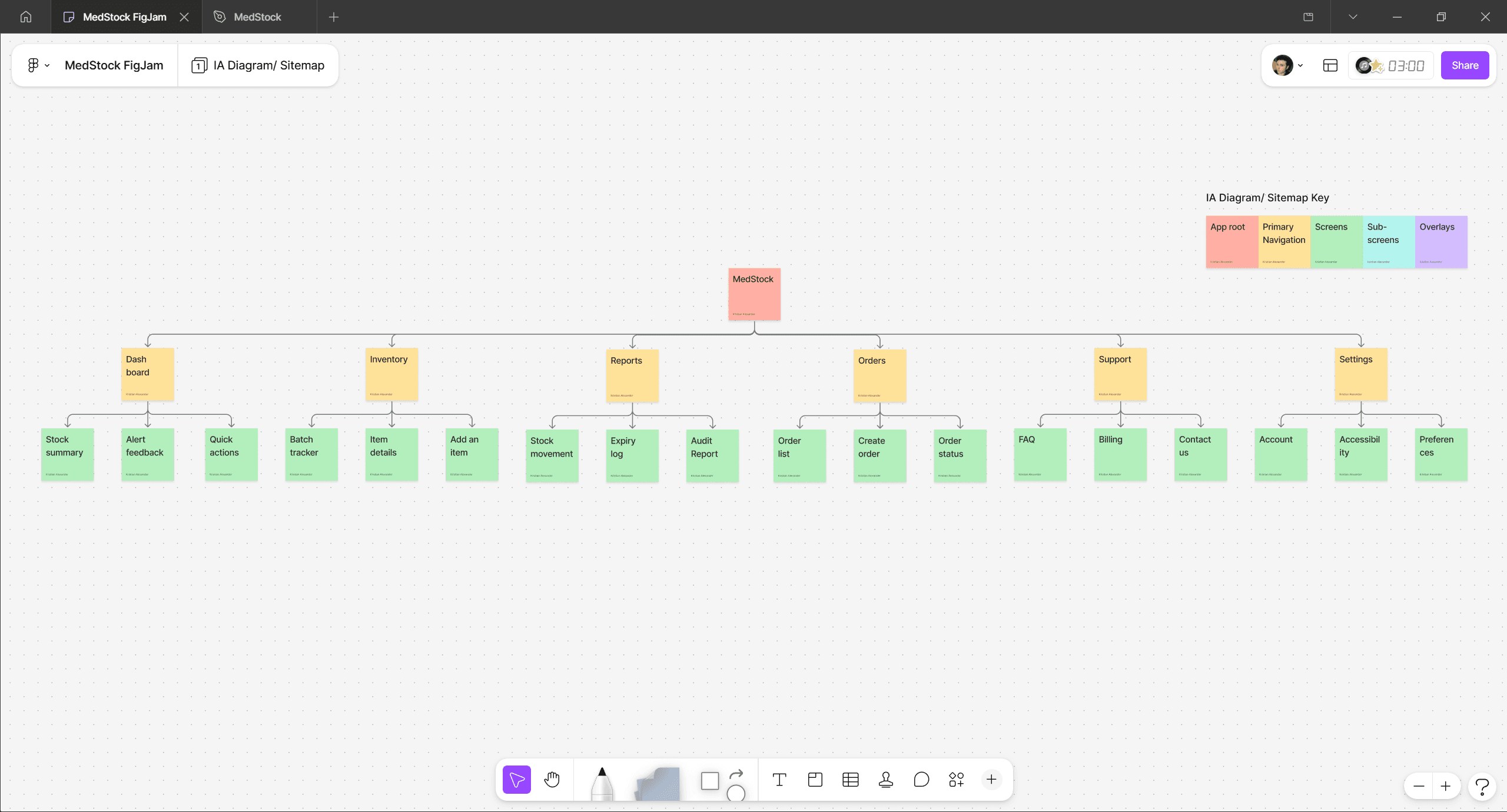
The IA diagram is organized across three levels. MedStock sits at the root, branching into six primary navigation sections: Dashboard, Inventory, Reports, Orders, Support, and Settings. Each section then expands into its own set of screens. Dashboard contains Stock summary, Alert feedback, and Quick actions. Inventory branches into Batch tracker, Item details, and Add an item. Reports covers Stock movement, Expiry log, and Audit report. Orders holds Order list, Create order, and Order status. Support breaks into FAQ, Billing, and Contact us. Settings expands into Account, Accessibility, and Preferences.
A few structural decisions are worth highlighting. Reports is kept separate from Dashboard because they serve different cognitive modes — Dashboard is for real-time awareness while Reports is for compliance and retrospective review. Orders is its own section because reordering is a multi-step workflow with distinct states rather than a single action. Support and Settings are given dedicated top-level placement because in a compliance-critical healthcare environment, access to billing, accessibility options, and account management needs to be consistently reachable rather than buried. Every structural choice in this diagram is tied directly back to the needs identified in the user research phase.
Dashboard
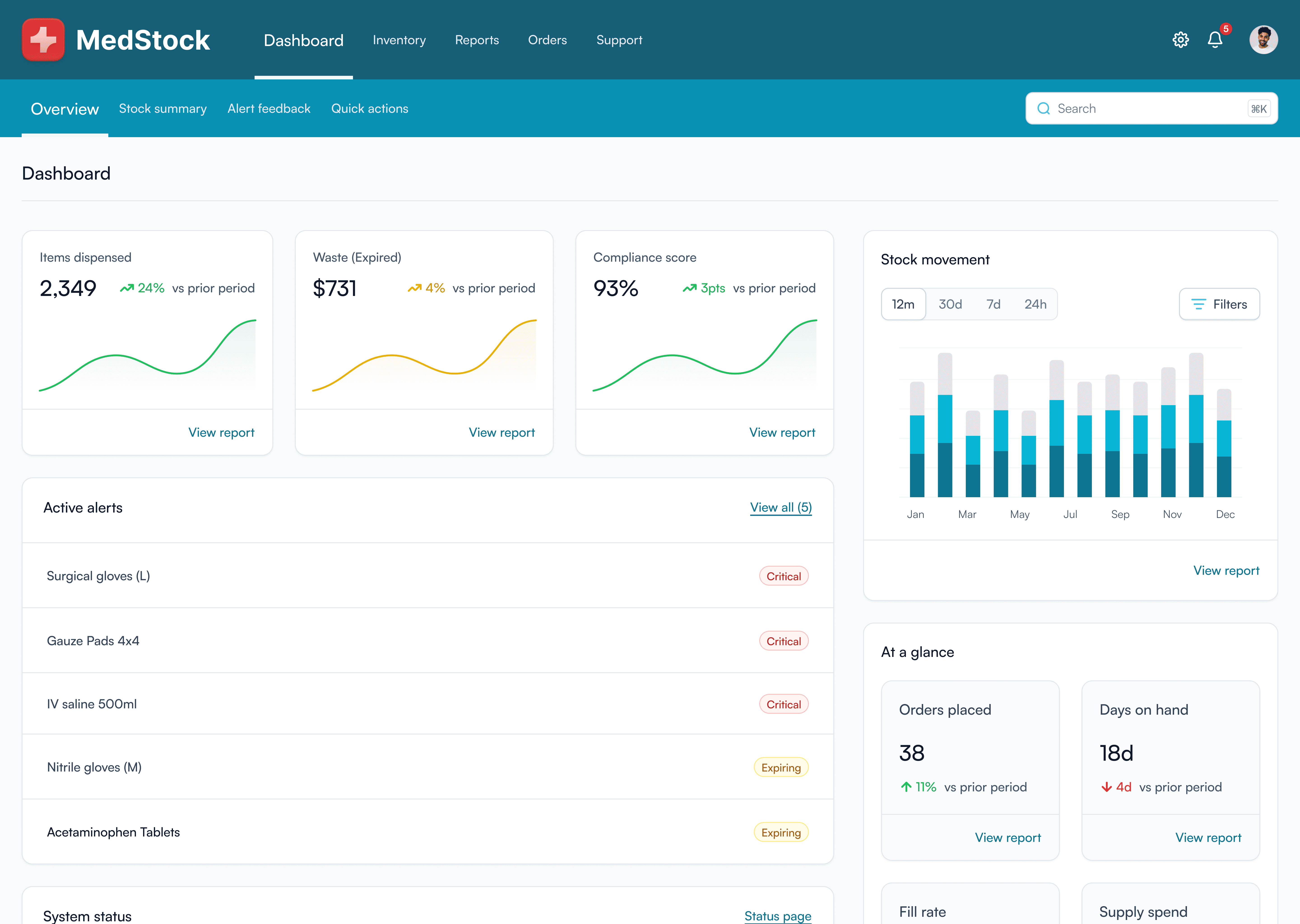
The Dashboard serves as the command center of MedStock, giving supply chain managers an immediate overview of operational health the moment they log in. Three metric cards at the top surface items dispensed, waste from expired products, and compliance score, each with trend lines and period-over-period comparisons to show direction at a glance. The active alerts panel sits prominently below, listing items flagged as Critical or Expiring so urgent action can be taken without navigating away from the home screen. To the right, the stock movement chart provides a 12-month view of supply activity with time filter controls, giving managers the historical context needed to spot patterns and anticipate demand. The at a glance section beneath it condenses key operational metrics including orders placed, days on hand, fill rate, and supply spend into compact cards, each linking directly to its full report. A system status strip at the bottom of the page keeps managers informed of any platform issues that could affect data reliability. Every element on this page was designed to shift the user from a reactive posture to a proactive one, replacing the fragmented spreadsheet workflow with a single, always-current source of truth.
Inventory
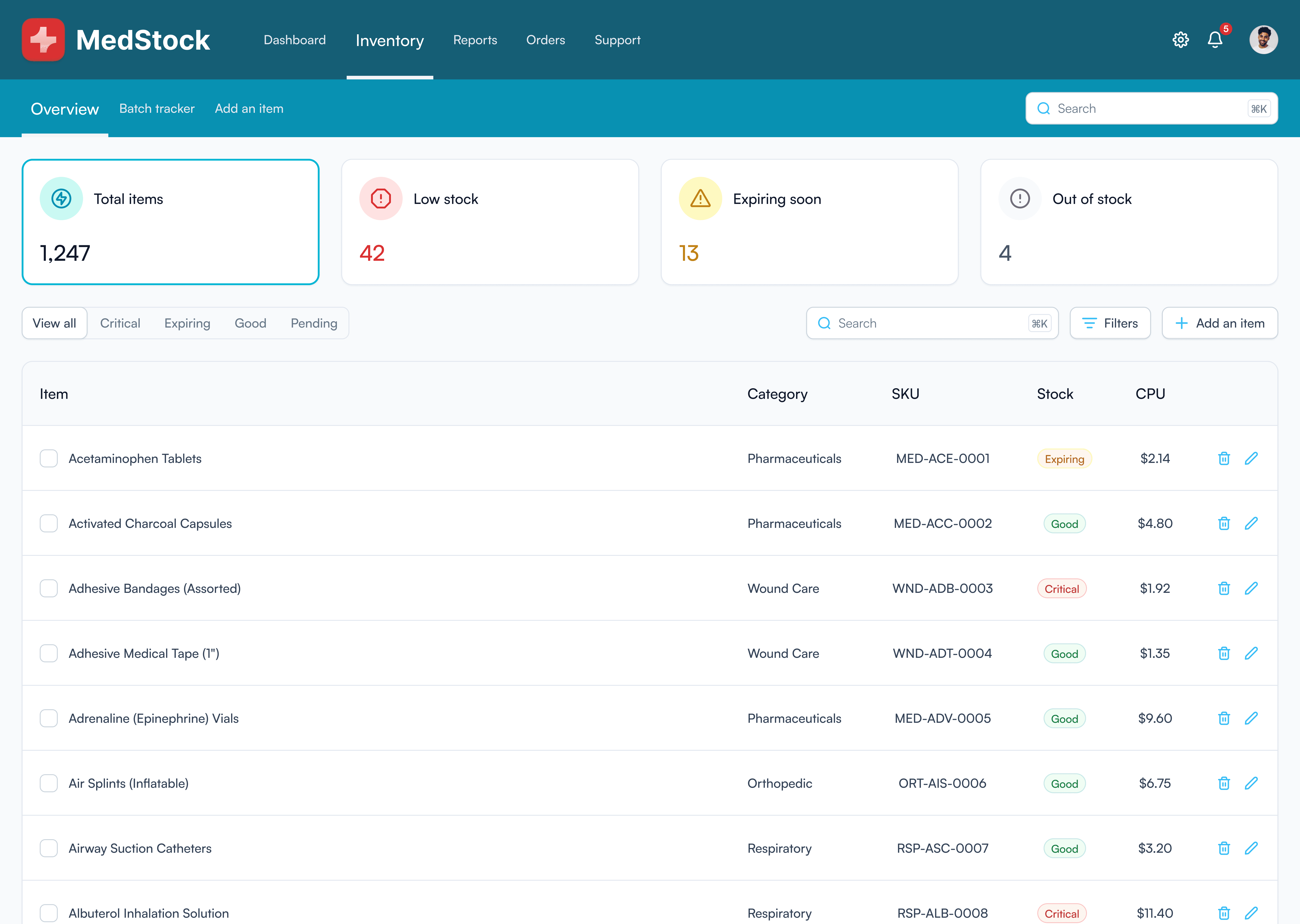
The Inventory page serves as the primary workspace for managing the full catalogue of medical supplies across the hospital network. At a glance, four summary cards surface the most critical numbers including total items, low stock count, items expiring soon, and items fully out of stock, giving supply chain managers an immediate read on the health of their inventory without needing to scan a single row. Below the summary, a filterable, searchable item table displays every supply with its category, SKU, stock status, and cost per unit. Status badges such as Critical, Expiring, Good, and Pending use color and text together to communicate urgency instantly, ensuring items requiring immediate action can be identified without reading every entry. The sub-navigation across the teal bar extends the page into dedicated views for the Batch tracker and Add an item flow, keeping complex tasks organized without overwhelming the primary list view. Every design decision on this page directly addresses the core research finding that manual spreadsheet tracking provided no reliable way to see the state of inventory at a glance, and MedStock replaces that with a structured, scannable, always-current overview that puts the right information front and center the moment a user arrives.
Reports
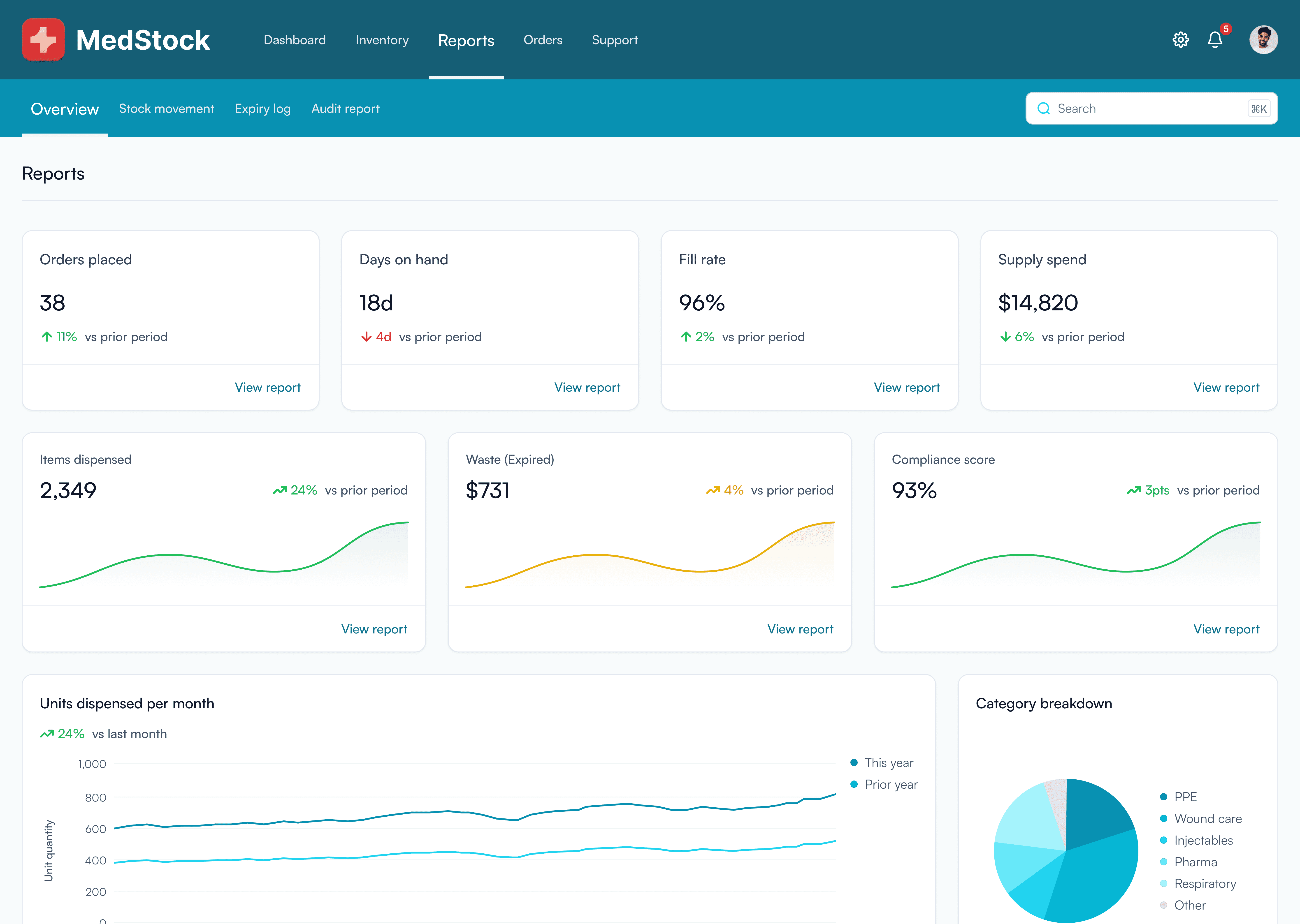
The Reports page transforms raw inventory data into meaningful operational and compliance insights, giving supply chain managers the information needed to report upward and make informed decisions. Two rows of metric cards cover seven key indicators including orders placed, days on hand, fill rate, supply spend, items dispensed, waste from expired products, and compliance score, each showing period-over-period trends so performance direction is immediately clear. Larger chart panels below provide deeper context, with a units dispensed per month line chart comparing this year against the prior year, and a category breakdown pie chart showing distribution of supply usage across PPE, wound care, injectables, pharma, respiratory, and other categories. Sub-navigation extends the page into dedicated Stock movement, Expiry log, and Audit report views, keeping detailed compliance documentation one tap away. Every metric on this page was chosen to directly address the pain points identified in research, replacing the manual reconciliation of spreadsheets with an automatically generated, always-current view of supply chain health.
Orders
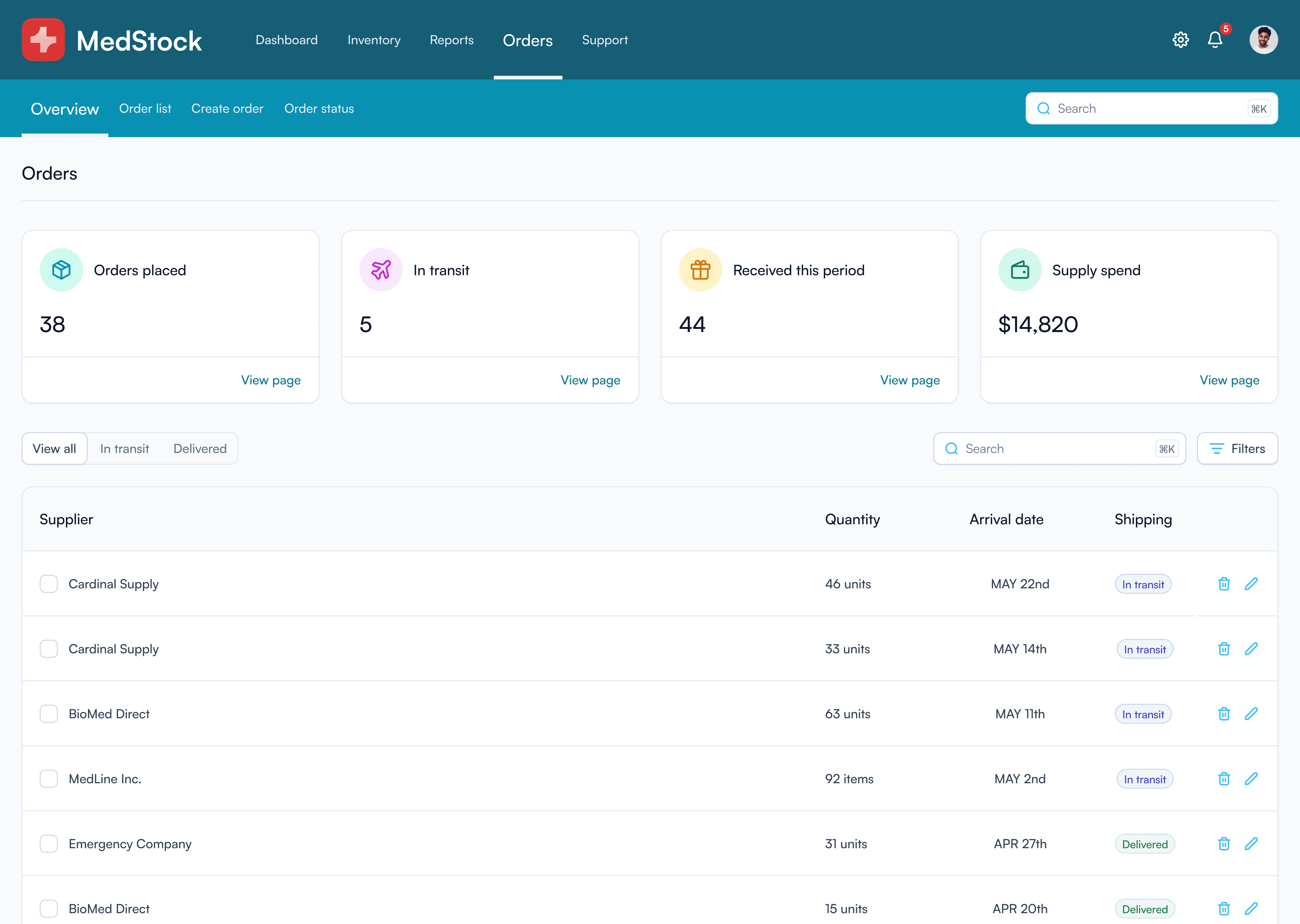
The Orders page gives supply chain managers a clear, consolidated view of all procurement activity across the hospital network. Four summary cards at the top display orders placed, items currently in transit, orders received this period, and total supply spend, providing an instant snapshot of purchasing health without needing to dig into individual records. Below the summary, a filterable order table lists every supplier order with quantity, expected arrival date, and shipping status, making it easy to track what is coming, when it is arriving, and what has already been delivered. Shipping status badges distinguish between in transit and delivered orders at a glance, reducing the need to chase suppliers for updates. Sub-navigation across the teal bar extends the page into dedicated views for the Order list, Create order, and Order status flows, keeping the full procurement workflow accessible from one place. This page directly replaces the fragmented email chain process that previously made order tracking unreliable, bringing every supplier interaction into a single, auditable, always-current view.
Support
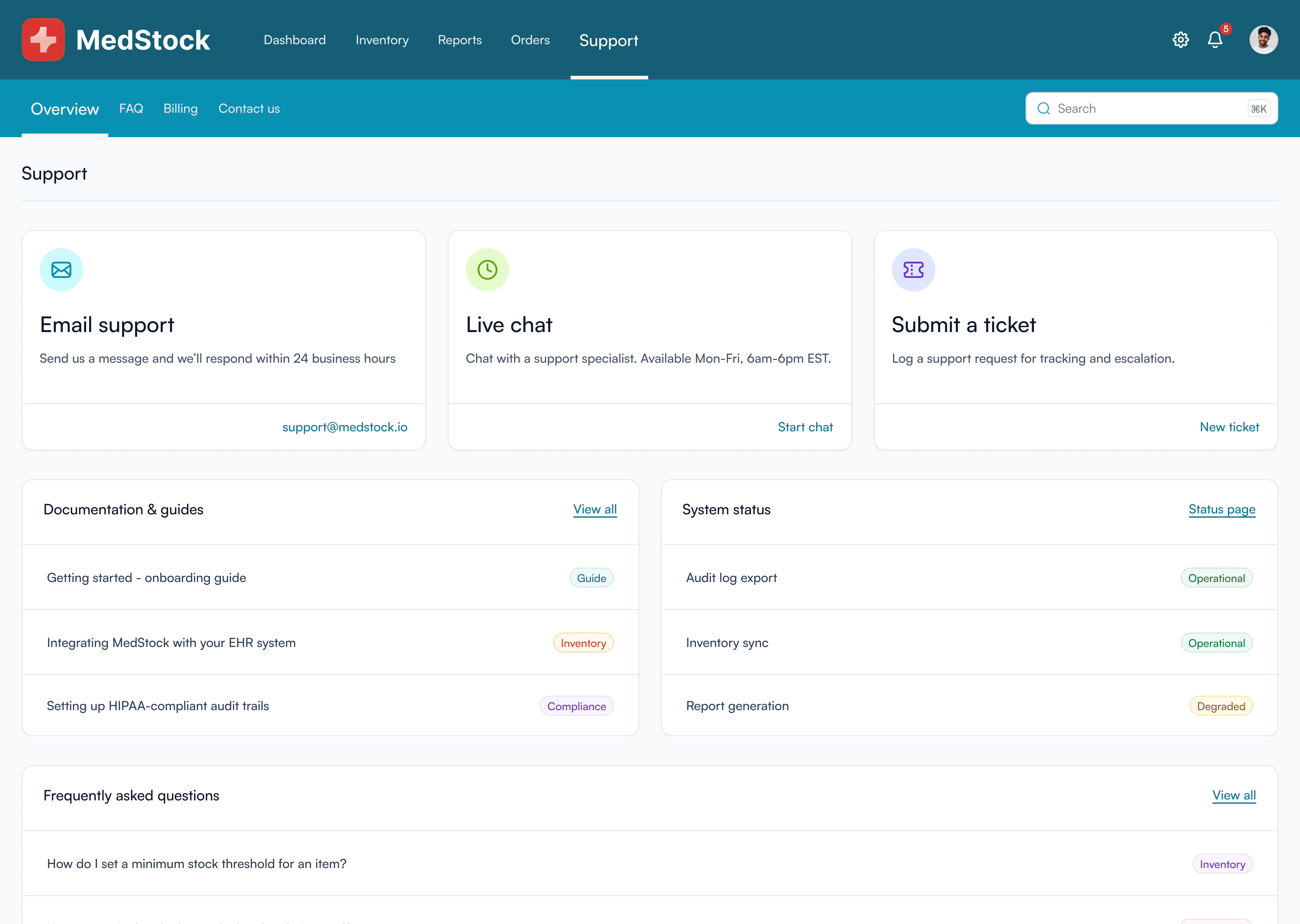
The Support page consolidates all help resources into one accessible location, ensuring users can get assistance without leaving the application. Three contact options sit at the top of the page covering email support, live chat, and ticket submission, each presenting a clear response expectation and a direct call to action. Below, a Documentation and guides panel surfaces key onboarding and compliance articles including EHR integration guidance and HIPAA-compliant audit trail setup, reflecting the specific technical needs of healthcare environments. A real-time system status panel sits alongside it, displaying the operational state of core functions such as inventory sync, audit log export, and report generation, so users can immediately identify whether a platform issue is affecting their workflow. A frequently asked questions section at the bottom addresses common inventory and compliance queries, reducing the need to contact support for routine questions. Sub-navigation gives quick access to FAQ, Billing, and Contact us from anywhere within the Support section.
Settings
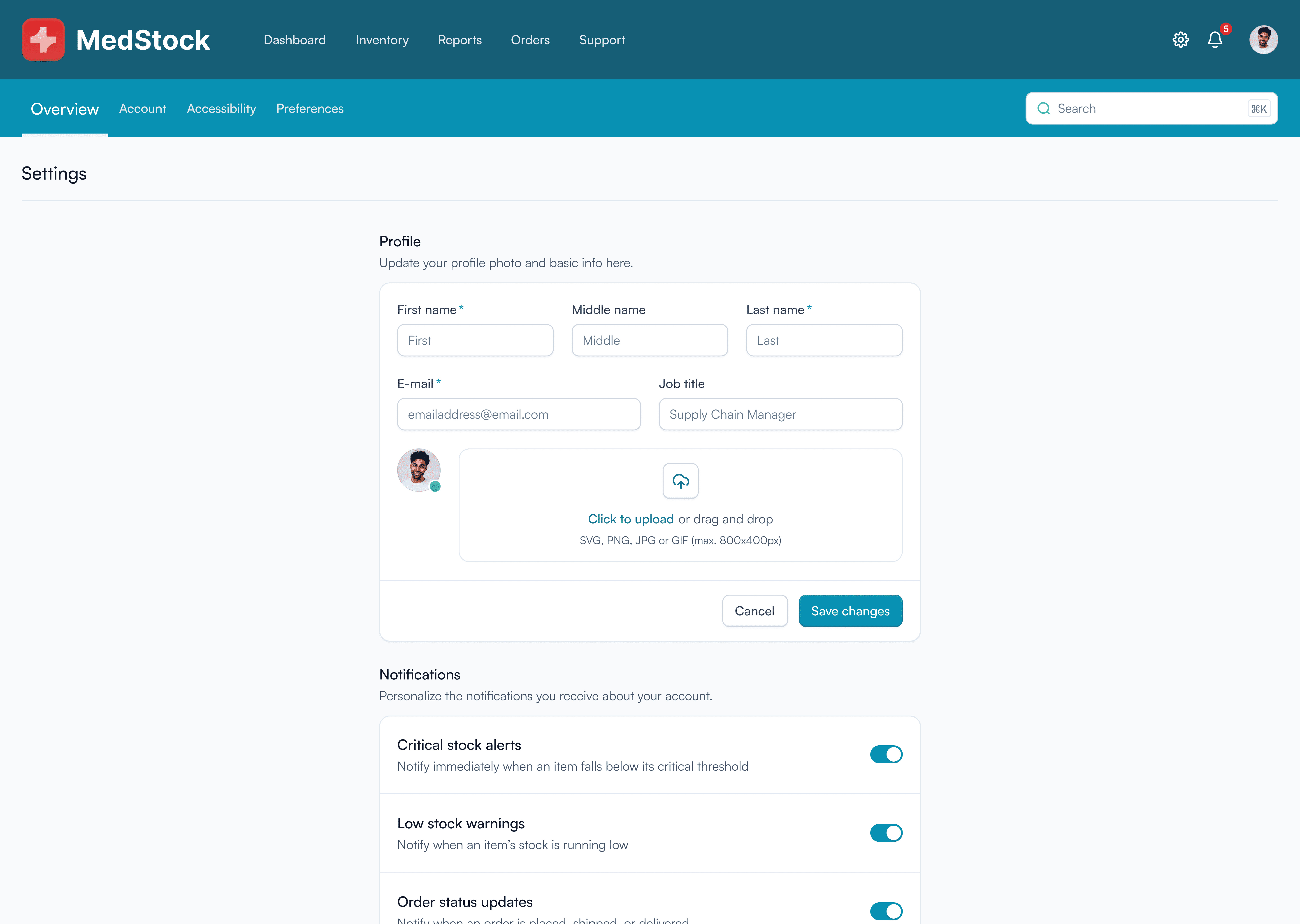
The Settings page allows users to manage their account details and personalise how MedStock works for them. The Profile section sits at the top of the page, providing fields for name, email, job title, and a profile photo upload, keeping user information up to date across the platform. Below it, a Notifications section gives users granular control over which alerts they receive, with individual toggles for critical stock alerts, low stock warnings, and order status updates. Sub-navigation across the teal bar extends the page into Account, Accessibility, and Preferences sections, ensuring configuration options remain organized and easy to locate without cluttering a single view.